

Twitch Drops - March 24th to April 6th!
Get ready for another epic Twitch Drop campaign! Tune into participating streamers from March 24th to April 6th 9:30 AM PDT, and snag some sweet rewards:
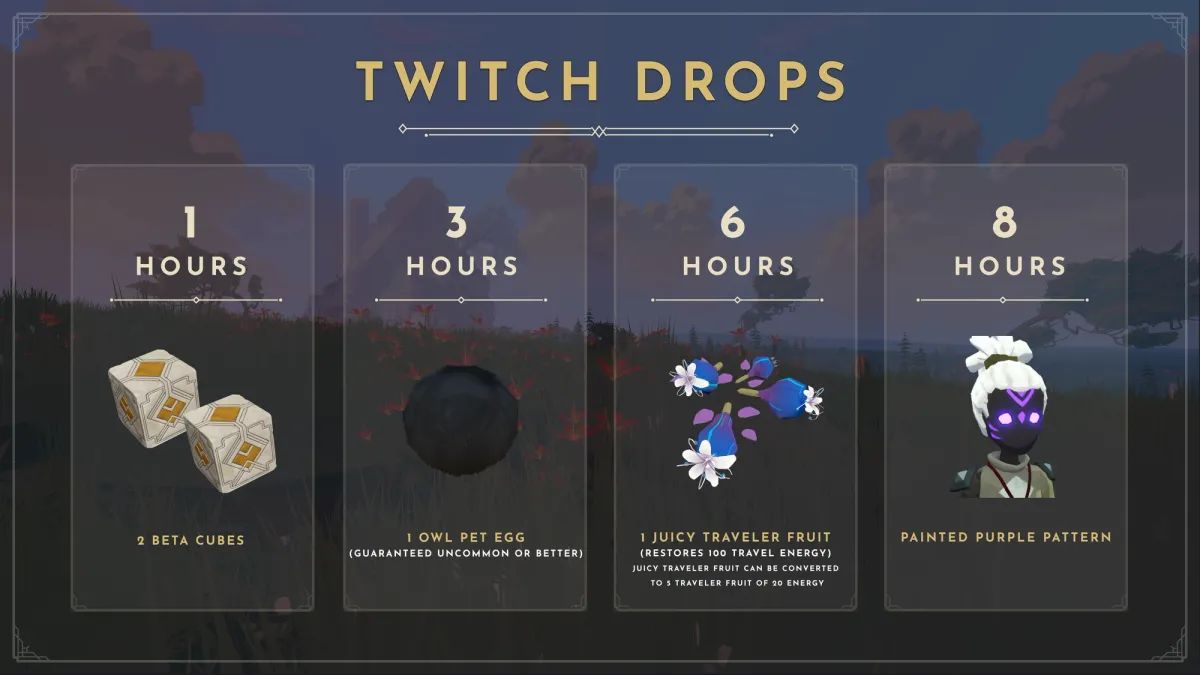
- 1 Hour Watch Time: 2 Beta Cubes
- 3 Hours Watch Time: 1 Owl Pet Egg (Guaranteed uncommon or better!)
- 6 Hours Watch Time: 1 Juicy Traveler Fruit (Restores 100 travel energy!) Can be converted to 5 Traveler Fruits.
- 8 Hours Watch Time: Painted Purple Pattern
Don't miss out!
How to Participate
To earn your exclusive in-game rewards, you must first link your Bitcraft Online Hub account with your Twitch account and then watch participating Twitch streamers who have Drops enabled.
1. Link Your Accounts
- Log in to your Bitcraft Online Hub account on our official website.
- Navigate to the Settings page.
- To earn rewards by watching, select Connect as a Viewer.
- We are also running a campaign called “Bit by Bit.” If you are a streamer, click Connect as a Streamer, and you and the viewer will be able to earn hextite shards in-game when a viewer cheers bits. Hextite shards are premium currency in Bitcraft Online that can be spent in the premium store to buy pets, player cosmetics, and empire cosmetics.
- Follow the on-screen instructions to authorize the connection between your accounts.
2. Watch and Earn
- Watch any streamer playing Bitcraft Online in the BitCraft Online Game Category section who has Twitch Drops enabled.
- Meet the watch time requirement for the reward you wish to claim. Progress is tracked automatically on your Twitch Drops Inventory Page.
- Once the required time is met, you must claim the reward from your Twitch Drops Inventory.
3. Claim Your Rewards BitCraft Hub Account and In-Game.
After claiming your reward on Twitch, it will be automatically added to your Bitcraft Online Hub account and also added to your in-game Vault on the next login. Beta Cubes need to be opened on the website before you will get the contents in-game.
Important Notes:
- Make sure your accounts are linked before you start watching! Watch time accumulated before the link is established may not count.
- You must claim the reward in your Twitch inventory before it is delivered to your game account.