

Twitch Drops February 26th to March 12th
To celebrate the start of Early Access 2 and the 'new world' following the Early Access 1 wipe, Bitcraft Online is launching a new Twitch Drops campaign .
This campaign will run from February 26th to March 12th and offers a total of five rewards for players to earn. One of these rewards is a returning cosmetic, the "Twitchy” in-game title, giving players who missed a previous Twitch Drops campaign another chance to obtain it. You will also be able to earn the First Awakened Cape (This is an Empire Cape, so it will feature the Empire logo) at 5 hours of watch time. Players will also be able to earn several Beta cubes which each contain a random Star stone pet.
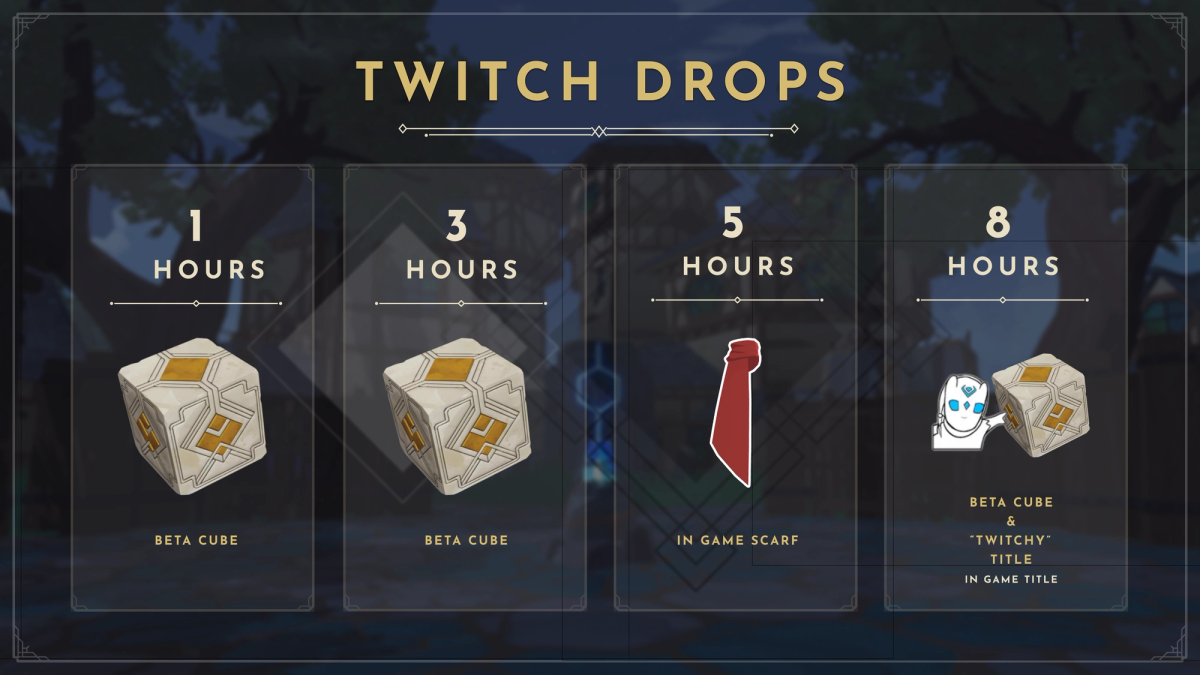
How to Participate
To earn your exclusive in-game rewards, you must first link your Bitcraft Online Hub account with your Twitch account and then watch participating Twitch streamers who have Drops enabled.
1. Link Your Accounts
- Log in to your Bitcraft Online Hub account on our official website.
- Navigate to the Settings page.
- To earn rewards by watching, select Connect as a Viewer.
- We are also running a campaign called “Bit by Bit.” If you are a streamer, click Connect as a Streamer, and you and the viewer will be able to earn hextite shards in-game when a viewer cheers bits. Hextite shards are premium currency in Bitcraft Online that can be spent in the premium store to buy pets, player cosmetics, and empire cosmetics.
- Follow the on-screen instructions to authorize the connection between your accounts.
2. Watch and Earn
- Watch any streamer playing Bitcraft Online in the BitCraft Online Game Category section who has Twitch Drops enabled.
- Meet the watch time requirement for the reward you wish to claim. Progress is tracked automatically on your Twitch Drops Inventory Page.
- Once the required time is met, you must claim the reward from your Twitch Drops Inventory.
3. Claim Your Rewards BitCraft Hub Account and In-Game.
After claiming your reward on Twitch, it will be automatically added to your Bitcraft Online Hub account and also added to your in-game Vault on the next login. Beta Cubes need to be opened on the website before you will get the contents in-game.
Important Notes:
- Make sure your accounts are linked before you start watching! Watch time accumulated before the link is established may not count.
- You must claim the reward in your Twitch inventory before it is delivered to your game account.
⭐️Explore and build in the world of Starfell ⭐️Start your journey and play BitCraft Online today!